
Douglas Corporation DC-10-30/30F
For Microsoft FS2004
Douglas Corporation DC-10-30/30F
For Microsoft FS2004
Last Updated March 18, 2006
|
|||||||
Download:
 Click here to download the DC-10-30
(51 MB Download)
Click here to download the DC-10-30
(51 MB Download)
Click
here to warp to the Panel Department for links to optional
panels
NOTAM: Read the how to fly manual before attempting to fly this airplane. When installed it will be over Maximum Gross Weight and will require that you either off load fuel, passengers, or cargo prior to takeoff. This airplane must also adhere to a strict climb schedule or you will not make it to your cruise altitude. Finally the DC-10 cruises at a lower altitude than other airplanes such as the 767 / 777. Please take note of the recommend cruise altitudes based on weight.
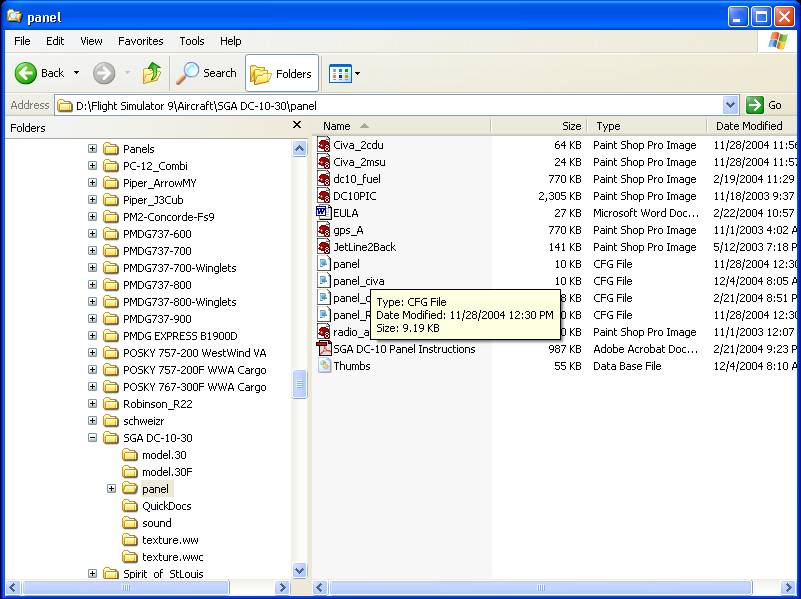
Choice one of three panel configurations, DC-10-30 by SGA, DC-10-30 by SGA with CIVA Dual INS, and DC-10-30 by SGA with Dual CIVA INS and RealityXP Jetline 2 EFIS. INS version requires that you download and install the Civa INS separately available here. EFIS version requires that you own the commercial product RealityXP Jetline 2 gauges. To choose your panel browse to the Flight Simulator 9/aircraft/SGA DC-10-30/panel folder. Delete the panel.cfg, then rename the panel you wish to use to panel.cfg
panel_org.cfg The original SGA version
panel_civa.cfg The original SGA version ready for civa dual INS (default)
panel_RXP.cfg The original SGA version with civa dual INS and RealityXP Jetline 2 EFIS


 Back to the
FS2002 & FS2004 Hangar Page
Back to the
FS2002 & FS2004 Hangar Page Back to WWAL FBO