
WestWind Static Aircraft
For Various WestWind Hubs (FS98)
WestWind Static Aircraft
For Various WestWind Hubs (FS98)
Last Updated May 13, 2007
Why settle for Flight Sim default static aircraft when you can have WestWind static aircraft instead !!!?
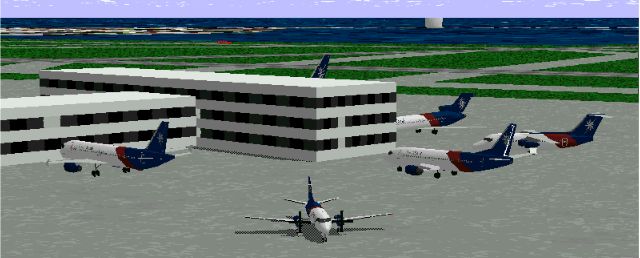 WestWind's Terminal at Boston Logan International Airport (above) WestWind's Terminal at Chicago, O'Hare International Airport (right) |
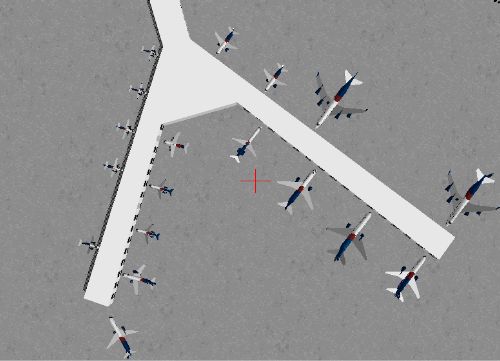 |
This is the question WestWind's Andrew Webb (A4018) asked himself... just before he started designing static WWAL aircraft files for various WWAL hubs and Fly-Ins!! Andrew is now making these files available for all our airmen to enjoy. If you'd rather see WWAL aircraft instead of the "very generic" default aircraft, then download the files below and follow the simple installation instructions included with the files.
1. First, you MUST download the following file which contains static aircraft in WWAL colors: Please note this file replaces WWSTATX.zip and should be installed over the old file. This is important.
| File Name | Content |
|
Static aircraft files - |
2. After you have download the above mentioned file, download your choice of the files from the list below. These are needed to position the WWAL static aircraft at various WWAL hub airports.
| File Name | Airport Name |
| Atlanta's W. Hartsfield Int'l | |
| Boston Logan Int'l | |
| Cincinnatti, OH | |
| Dallas/Ft. Worth Int'l | |
| Washington Dulles Int'l | |
| John F. Kennedy Int'l, NY | |
| Miami Int'l | |
| Chicago O'Hare Int'l | |
| Norfolk, VA | |
| Portland Int'l | |
| Seattle-Tacoma Int'l | |
| San Francisco Int'l | |
| Salt Lake City, UT | |
| London, England | |
| WestWind's Training Center and Resort | |
| Vancouver, Canada |
3. Please carefully read the readme.txt file included with each of the above files. Installation is a snap -- mostly just a matter of putting .bgl files into your FS/Scenery subdirectory -- but there are a few exceptions. These are noted in the readme.txt files.
Optional...
If you would like to place WWAL static aircraft at an airport of your choice (other than the airports listed above) and if you have FSWOW! (from Apollo Software) or Prefab (from Tekmate), you can use the file below to place aircraft at airports of your choice. You must have either Prefab or FSWOW to use the following file...
| File Name | Content |
| Prefab files |
We will continue to post additional files for other WWAL hubs here as Andrew creates them and makes them available to us. In the mean time, please drop him a note to thank him for his efforts (using the e-mail link below).
A HUGE WestWind "Thanks" to Andrew for his hard work & creative talent.
 If you have questions or want to thank Andrew personally, click here.
 - replaces WWSTATX.zip
 Back to the Main Scenery Page
 Back to WWAL's FBO